.png?width=158&height=34&name=Autarco%20logo%20(1).png)
When setting up an Energy Management System (EMS), reliable local network communication between the EMS controller, inverters, meters and other devices is essential. In real installations, problems often appear when one or more devices are connected through a wifi extender or repeater instead of directly to the main network.
This article explains why this happens and which network setups work correctly with Modbus TCP.
How Wi-Fi repeaters work
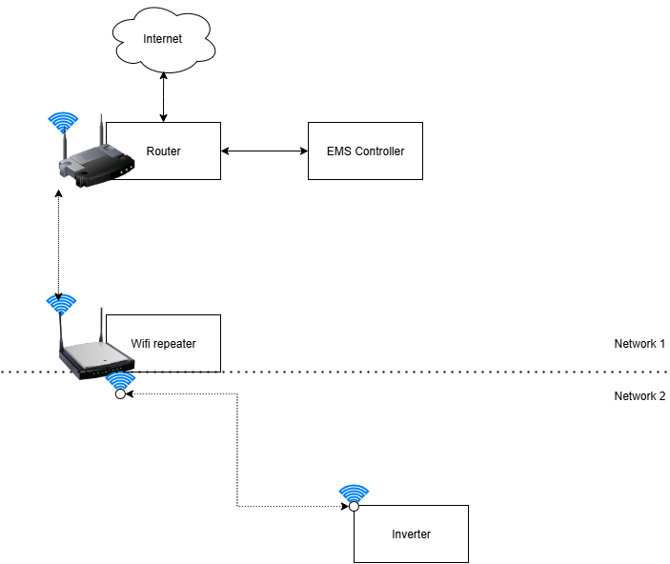
A wifi extender does not truly extend your existing network. Technically, it connects to the main network as a normal client and then creates a second wireless network on top of it. In many cases, this new network uses the same SSID as the original wifi, which makes it appear as if everything is on one network.
In reality, the extender acts as an intermediary. All traffic from devices connected to the extender passes through the extender before reaching the router. This means those devices are no longer in the same local network segment as devices connected directly to the router.
Why this causes problems for EMS controllers
EMS controllers use Modbus TCP and other local network mechanisms to automatically discover and communicate with devices. This relies on broadcast traffic, multicast messages and local IP scanning inside the same network segment.
Wifi extenders often block or filter this type of traffic. They behave like a small firewall and only forward traffic that looks like normal internet traffic. Local discovery traffic is often not forwarded correctly.
As a result, the EMS controller may not see inverters or meters, or communication becomes unstable. Even when the wifi name is identical, the EMS controller and the devices are not truly on the same local network.
Typical failure scenario
A common situation is that an inverter is connected to a wifi extender while the EMS controller is connected directly to the router. In the user interface it looks like both devices are on the same network, but technically they are separated by the extender. The EMS controller is therefore unable to discover or communicate with the inverter.
This behaviour is expected in this type of network setup and is not a fault in Helios or in the EMS controller.
Recommended network setup
For reliable EMS operation, a transparent local network is required. The most reliable solution is to connect devices using an ethernet cable directly to the router or to a network switch.
If wireless coverage needs to be extended, use a device that operates in true Access Point mode. In this mode the existing network is extended without creating a new subnet and without blocking local traffic. All devices remain visible to each other on the same network.
Wifi extenders that create their own subnet, perform NAT or filter local traffic are not suitable for EMS communication.
If you use a wireless extension device, always verify that it is running in Access Point mode and not in repeater or extender mode.
Summary
Wifi extenders often break the local network communication required for Modbus TCP. Even when the wifi name is the same, devices are not on the same network. The EMS controller requires transparent local communication to discover inverters and meters. Always use wired connections or true Access Point devices where possible.