.png?width=158&height=34&name=Autarco%20logo%20(1).png)
Overview
Dealers and installers often ask how they can enable email notifications for their end-users in Helios. Installers can easily miss alert emails because they manage many systems, which may lead to system issues going unnoticed. In many cases, end-users can resolve simple issues themselves (e.g., performing a reset).
To support this, Helios provides a per-user, per-system notification feature.
This article explains how to enable issue notifications for end-users.
(A separate article is available for enabling issue notifications for dealers.)
About the Notification Feature
-
Notifications are not enabled by default.
-
They are toggled per system per end-user.
-
Only the users who are explicitly enabled will receive issue notifications.
-
Other users linked to the system will not receive emails unless manually enabled.
- Within one system, every user with the notifications enabled receives the same alerts.
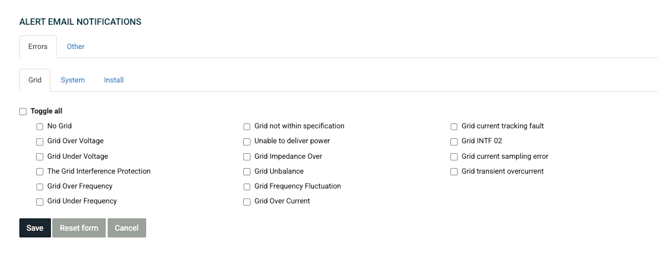
- The types of issues that a user gets notified about can be selected in the issue filter.
This ensures installers remain in control of who receives system health alerts.
How to Enable Issue Notifications
Follow the steps below:
1. Open the System in Helios
-
Log in to Helios.
-
Use the search bar to find the system you want to manage.
2. Go to the “MyAutarco Access” Page
On the asset management menu, select MyAutarco access.
Here you will see a list of all end-user accounts connected to this system.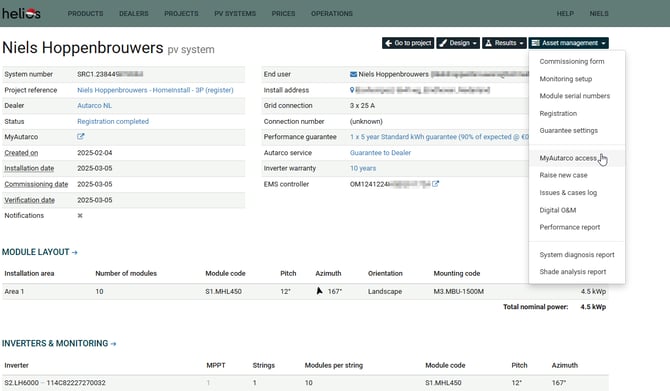
3. Check Current Notification Status
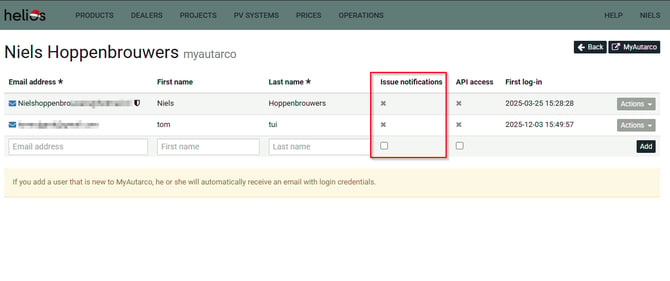
In the table, look for the column Issue notifications.
This column shows which accounts currently have notifications enabled.
4. Enable Notifications for an End-User
In the Actions column, click:
Enable issue notifications
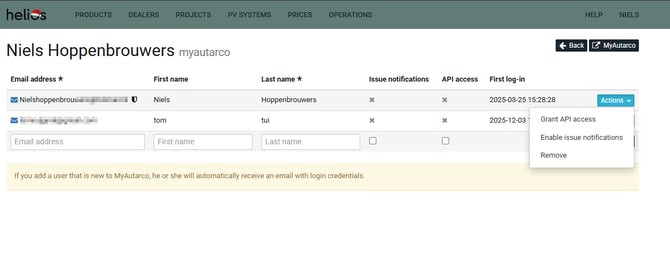
A confirmation message will appear indicating that notifications have been successfully turned on, and the Alert Email Notifications filters will appear, allowing you to select which types of issues should be forwarded.
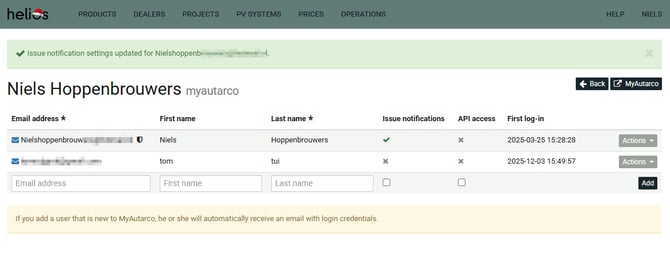
Once enabled, this user will start receiving system issue emails automatically.